Singtel Mesh Router
Supported Services
Wireless Connection Mode
*Dependent on broadband subscription
WPS Push Button
2.4GHz
5GHz
Mac Filtering
Gigabit Ethernet LAN
Voice Port
USB Host Support
DDNS
The colours of each LED light on your Singtel Mesh Router have different meanings. Use this guide to understand more.
POWER LED
Internet LED
LAN LED
Mesh LED
Using Dual-band feature on Singtel WiFi Routers
Your new router features dual band support which means that there will be 2 WiFi networks that you can connect to concurrently – on 2.4Ghz and 5Ghz frequencies.
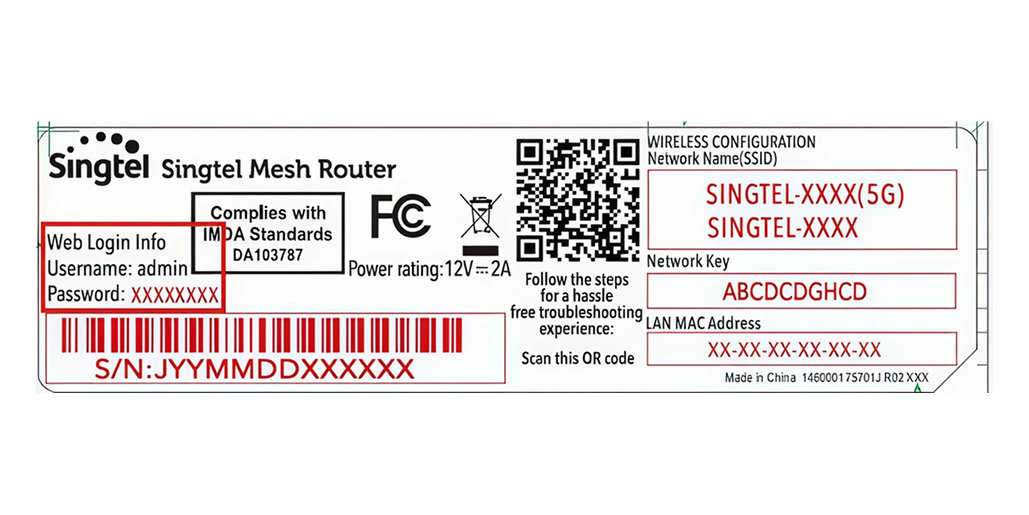
You can locate both 2.4Ghz & 5Ghz Network Names and password on your router by following these steps:
Look at the back of the WiFi Router.
Locate the WiFi label at the back of the WiFi Router. The SSID and key for the network is displayed under WIRELESS CONFIGURATION. Find the network on your WiFi device and connect to either 2.4Ghz or 5Ghz WiFi Network with the default network key.
You’re now able to connect to the internet on your WiFi device
Which network should I use?
The 2.4Ghz network has a wider range but is typically more congested, meaning you get slower speeds. We advise to connect your devices to the 5Ghz network when in range to enjoy the fastest speeds.
You can also let your device choose the best WiFi network to connect to if you have saved both networks on your device.
Follow these steps to check the information of the devices connected to your network.
Visit http://192.168.1.254 to view your router configuration page.
Enter your username and password that can be found on the label at the back of your router that indicates Web Login Info. You will be able to find the information once logged in.
Follow these steps to check the information of the devices connected to your network.
Visit http://192.168.1.254 to view your router configuration page.
Enter your username and password that can be found on the label at the back of your router that indicates Web Login Info.
Click on General follow by Wireless link on the left menu.
By default, you will see the 2.4GHz and 5GHz wireless settings, Band Steering and WPS feature.
To apply any changes made to your Wireless settings, click on the Apply button or cancel to disregard the changes.
For technical assistance with your device, please call 1688. Singtel will provide security updates up to 30 November 2024.
Related articles
Didn’t find what you are looking for?
Let us know what you need and we’ll connect you to the right team.